

The four views of racing
My Races, Calendar, Series and Crew, what each one is for, and how the racing regions setting decides which harbors you see.
Also known as: racing, race calendar, what races, regatta, series, schedule, upcoming races, past races, regions, other harbors, away races, destination race
Tap Racing in the bar at the bottom. Under the title is a row of four views of the same racing, and you will use all of them for different things.
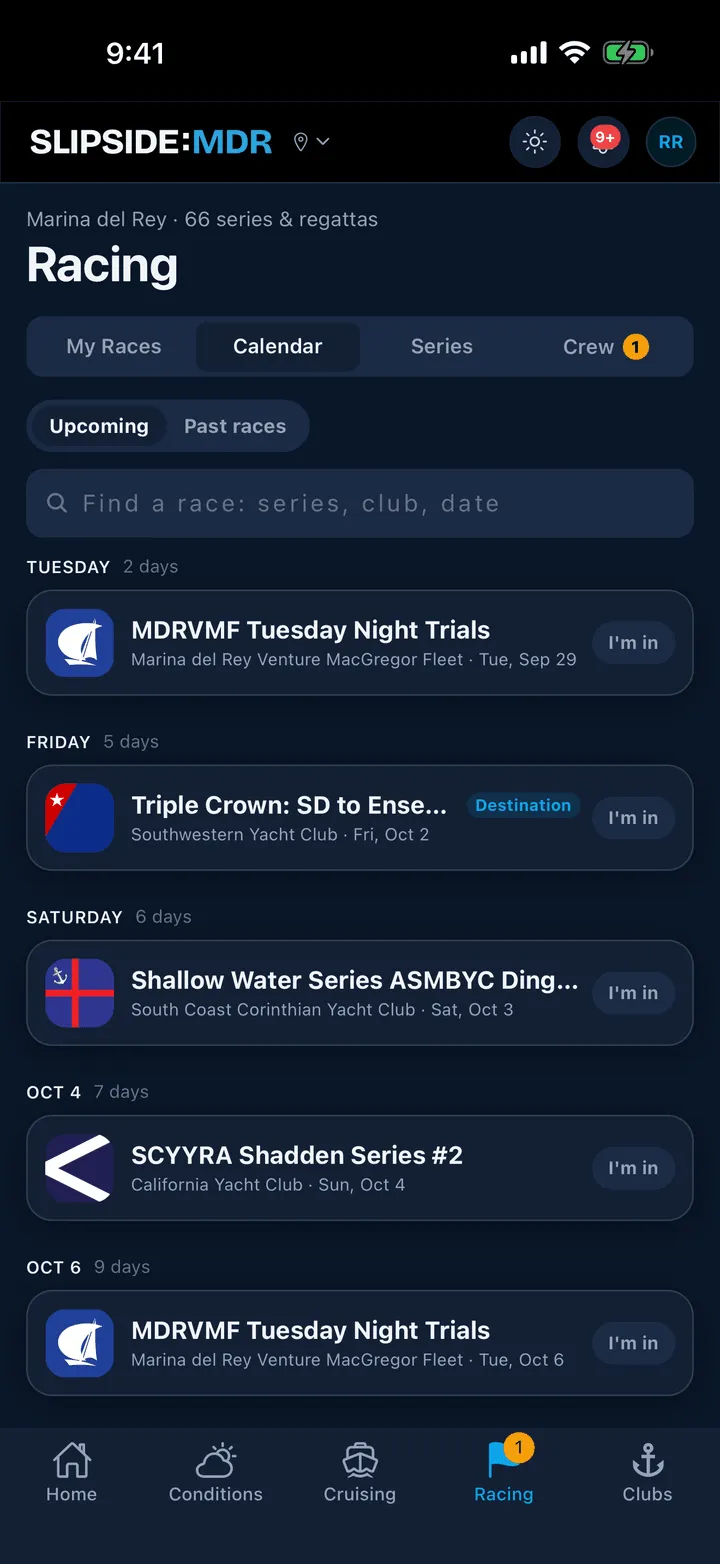
Calendar
Every race in the harbor, soonest first, grouped under Today, Tomorrow, a weekday name inside the coming week, then a date. A faint hint beside each heading says how far off it is.
Each row shows the club’s burgee, the series name, the host and the date. Tap the row to open the race page. Tap I’m in on the right to add it to your own list; see My Races.
The toggle at the top switches to Past races. That view groups by month and shows one row per race day, and it loads three months at a time behind a Show earlier button.
My Races
The races you are in, and the ones a skipper has assigned you to. Signed out it shows a card reading Track your races; there is nothing to see until you sign in. See My Races.
Series
Every series and regatta for the season, in two lists, Series and Regattas. A row shows the club, the name, the cadence, the season, how many races there are, and, when a boat in that series is short-handed, a tappable N looking for crew that jumps to the Crew tab.
Tap a row for the series page: standings, documents, entries, the full schedule and the divisions. See Series pages and standings.
Crew
The Crew Finder board, with boats looking for crew on one side and sailors available on the other. See How Crew Finder works.
Which harbors you see
The calendar is not only Marina del Rey. In Profile, under Racing regions, you can add any of eight regions from the Central Coast to San Diego; each row names the clubs it covers. Your home harbor’s region is always on and cannot be turned off; adding the others is part of Slipside Premium. The harbor picker at the top of the screen does not change the Racing tab: switch to Long Beach to read its wind and its guide, and your calendar stays the way you set it.
Two things are always shown whatever you pick: a Destination race, which starts somewhere else and finishes here or the other way round, and any race you have entered or are crewing on. An away race carries a small chip with its region, so you always know a start is not in the harbor.
Still stuck? In the app, open Profile, then Help & Support, and use Send to support. Otherwise email support@slipside.app.