

Posting a crew spot
Advertise an open spot on your boat, what each field is for, and how to extend, close or reopen the listing later.
Also known as: post a crew spot, looking for crew, need crew, advertise, listing, my listing, extend listing, close listing, crew found, reopen, urgent, one listing per boat
A crew spot is a post from your boat: what you need, when, and a bit about the program.
Posting one
-
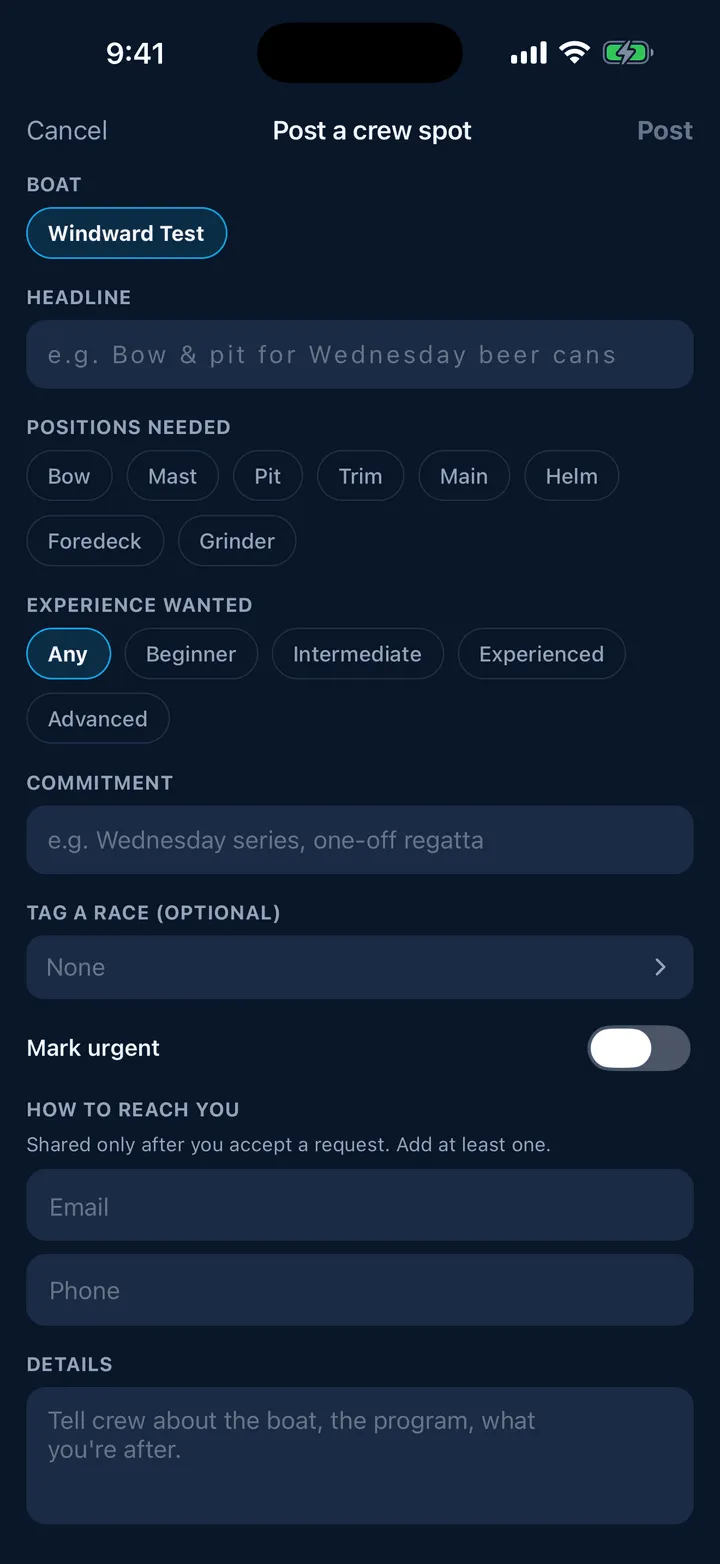
Open Racing, then Crew, and tap Post a crew spot. You can also open it from Profile, then My Boats, tapping a boat you own, then Find crew for this boat, which fills the headline in for you.
-
Pick the boat, if you have more than one. You can post without a boat on file, but naming one is better.
-
Write a headline, for example “Bow and pit for Wednesday beer cans”.
-
Tap the positions needed: Bow, Mast, Pit, Trim, Main, Helm, Foredeck, Grinder.
-
Set the experience wanted, from Any to Advanced, and the commitment, for example “Wednesday series” or “one-off regatta”.
-
Optionally tag a race so the listing is tied to a series.
-
Turn on Mark urgent if you need someone this week; urgent listings sort to the top.
-
Fill in how to reach you, an email address or a phone number. The line above it says what happens to it: Shared only after you accept a request. Add at least one.
-
Write the details, then tap Post.
One boat can have one open listing at a time. If you try to post a second, Slipside says: This boat already has an open crew spot. Edit or close it from Crew Finder.
Managing it
A Your listings card sits at the top of the Boats side of the board. Each row shows the boat, the positions and how many days are left, and ends in Manage or Reopen.
Tap a live listing for Edit listing, Extend 30 days and Close (crew found). Tap a closed or expired one for Reopen for 30 days and Edit.
A listing runs for 30 days and then expires on its own. Extending or reopening gives it another 30 from today. Nothing is deleted, so an old listing can always come back rather than being written again.
Your own listing appears in the feed like any other, with a green pill reading Your listing · manage it above where the interest button would be.
If your listing is not visible
The row in Your listings will say so, in amber, with the reason, for example Not visible to others. It contained contact info. Contact is shared automatically when a request is accepted. Edit the listing to fix it. See Reporting, blocking and the rules.
Still stuck? In the app, open Profile, then Help & Support, and use Send to support. Otherwise email support@slipside.app.