

Race reminders and result notifications
The four racing notifications, which switch controls each, when they arrive, and why some crew notifications have no switch at all.
Also known as: race reminder, notification, push, results notification, how did I place, standings moved, sailing instructions changed, SI change, race cancelled, quiet hours, turn off notifications
Racing notifications are off or on per kind, in Profile under Notifications. They need an account and your phone’s permission to send notifications.
The four you control
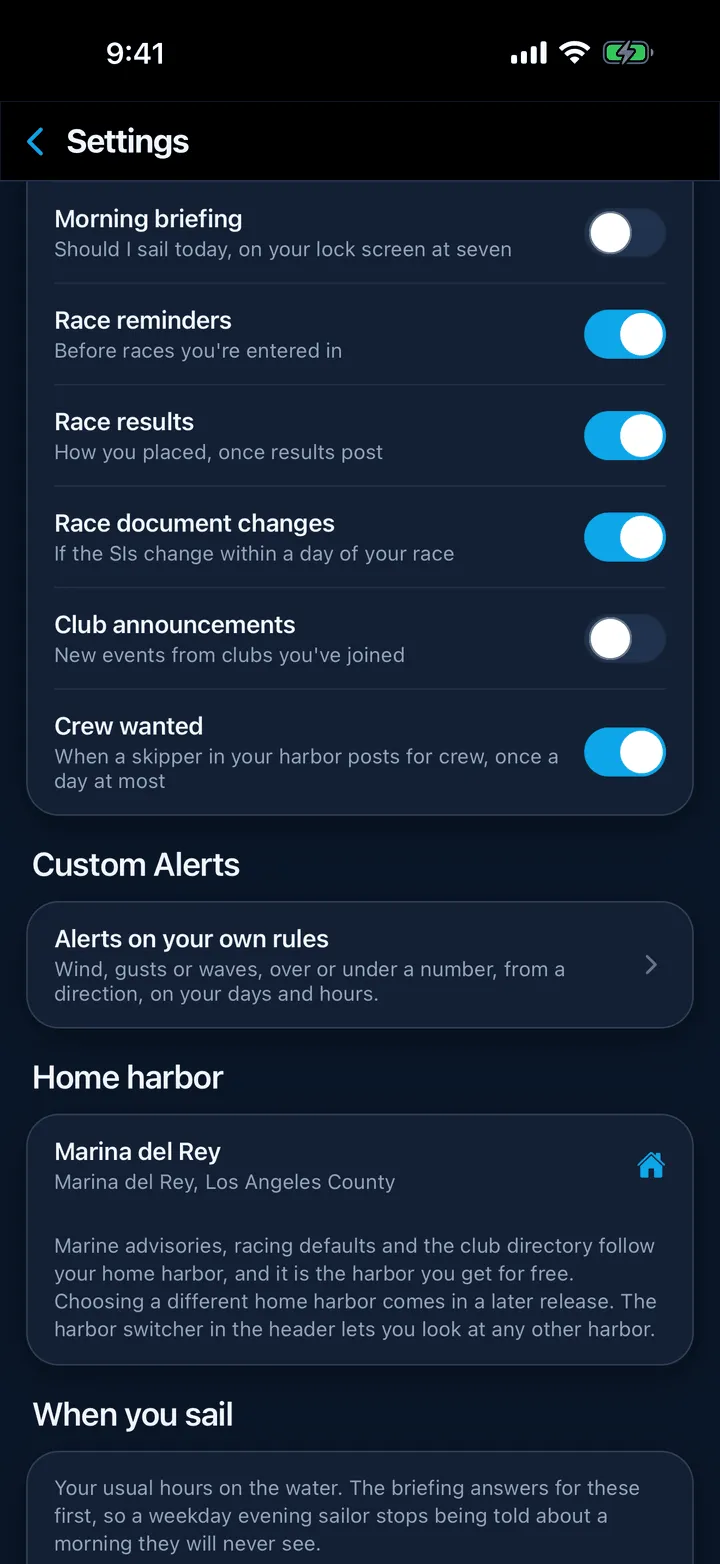
- Race reminders, “Before races you’re entered in”. Race morning at about 7 am, or roughly an hour before the start when the club has published one. It goes to everyone entered and every confirmed crew member. Off by default.
- Race results, “How you placed, once results post”. Titled with your finish, for example 3rd in PHRF B, with the body “You finished 3rd of 12 in PHRF B.” The same switch covers a plain Results are posted when your own boat was not matched, and Now 3rd in PHRF B when your position in the season standings moves. On by default.
- Race document changes, “If the SIs change within a day of your race”. Fires when a notice of race, sailing instructions or amendment changes within about three days and you race today or tomorrow. On by default.
- Club announcements, “New events from clubs you’ve joined”. Not strictly racing, but it lands here: a new public event at one of your clubs. Off by default.
Quiet hours run from 8 pm to 8 am, and results-type notifications wait until morning. A document change can arrive at any hour, because a changed set of sailing instructions the night before a race is worth waking up for.
The ones with no switch
Some notifications always send, because they are a person addressing you directly and a missed one costs somebody a place on a boat:
- A race is cancelled, to everyone entered and assigned.
- Crew assignment, when a skipper puts you on a race.
- Crew confirmed or Crew change, to the skipper when you answer.
- Crew invite, when a skipper adds you to a boat’s roster.
- A skipper’s notice, whose title is the boat’s name and whose body is the message itself.
For results to find you
Result notifications match your boats against what the club publishes, by sail number and boat name. If you never get one, open Profile, then My Boats, and check the sail number is on the boat.
If nothing arrives at all
Check your phone first: on iPhone, Settings, then Notifications, then Slipside; on Android, Settings, then Apps, then Slipside, then Notifications. The switches in Slipside keep working whether or not your phone allows notifications, so it is possible to have everything on and receive nothing. Whatever happens to the push, the message is still in your inbox behind the bell at the top of the screen.
Still stuck? In the app, open Profile, then Help & Support, and use Send to support. Otherwise email support@slipside.app.