

Asking to sail, and answering
Send an interest, answer one, and understand exactly when contact details are shared, what a decline means, and how Crew activity is organised.
Also known as: I'm interested, request, ask to sail, accept, decline, contact, phone number, email, crew activity, waiting on you, archive, cooldown, 30 days, no reply
Every approach in Crew Finder works the same way in both directions, and it is deliberately one round: you ask, they answer, and if the answer is yes you both get each other’s contact details.
Sending an interest
- Tap I’m interested on any card.
- The sheet opens with the line Reaching out to {name}. They’ll be notified and can share their contact if they accept. Your contact stays private until then.
- Add a note, which is optional but worth writing, and check the email or phone under How to reach you.
- Tap Send. The button on the card becomes Interest sent.
Do not put your phone number or email in the note. It will be rejected: Keep phone numbers, emails and links out of this field. Contact info is shared automatically when a request is accepted.
Answering one
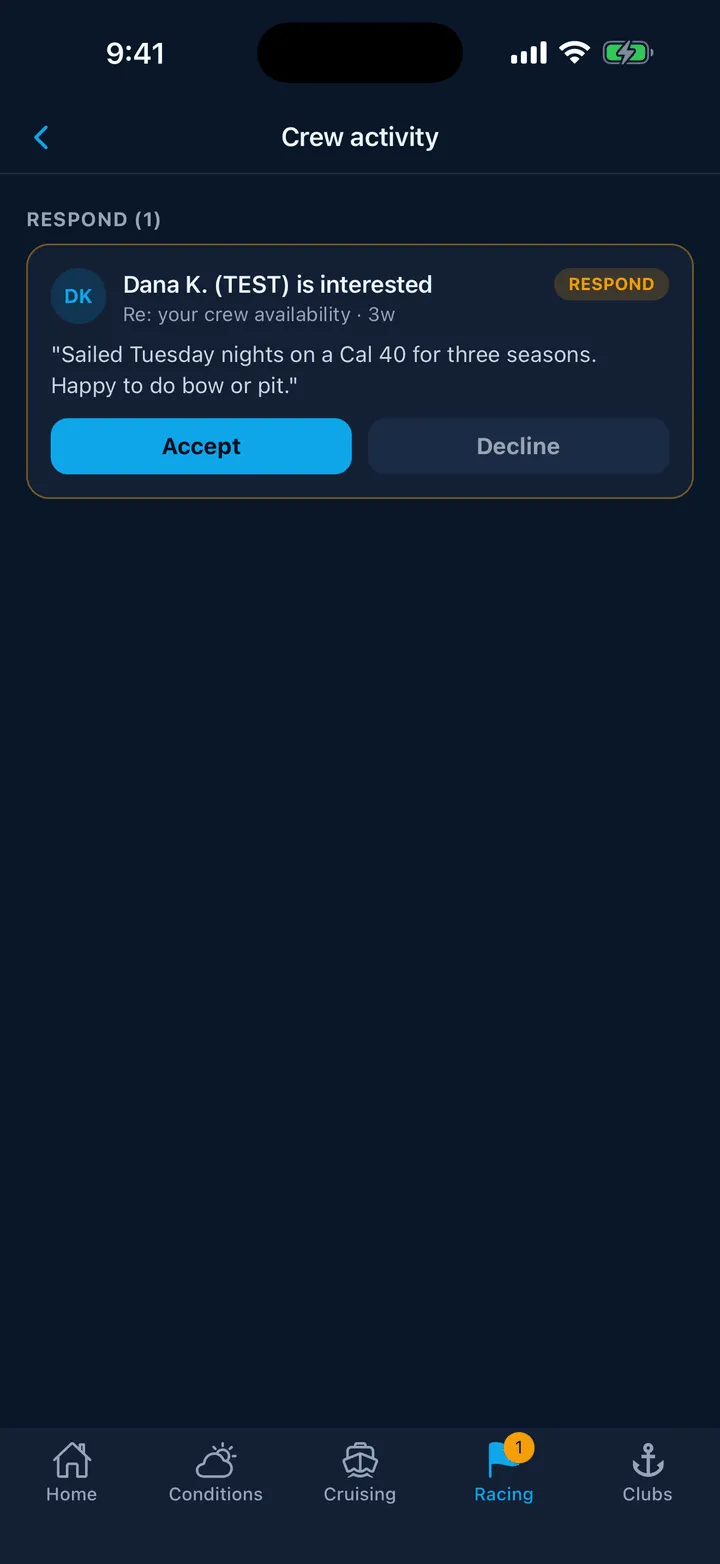
Open Crew activity from the link at the top of the Crew board, from the card that says someone is waiting on you, or by tapping the notification.
Requests that need you sit under NEEDS YOU with an amber outline. Each shows who is asking, what about, their note, and two buttons, Accept and Decline.
Accept is one tap. Both of you immediately see the other’s contact in a green box on that row, and the person who asked gets a notification.
Decline asks once to be sure. The wording tells you what they will be told: They’ll be told the spot isn’t available, without a push notification. They can ask again in 30 days, or sooner on another boat you post. Nobody is told who declined them, and no push is sent.
The 30-day cooldown
After a decline, the same person cannot ask you about the same listing again for 30 days: They passed on this recently. You can ask again in 30 days, or on another boat they post. A different listing is a different conversation, so a new post from the same skipper can be asked about straight away.
Reading Crew activity
One screen holds everything: crew requests both ways, invitations to a boat’s roster, and race assignments.
- NEEDS YOU is anything waiting on your answer.
- EVERYTHING ELSE, or RECENT, is the rest.
- History at the bottom holds answered requests older than 30 days. Nothing is ever deleted.
Pills tell you where each one stands: NEEDS YOU, WAITING when it is with them, ACCEPTED, DECLINED.
Swipe an answered request to the left to Archive it. That tidies your own list only; the other person’s view does not change. Roster places and race assignments cannot be archived, because those are standing facts rather than correspondence.
From a request to a roster
When you have accepted a sailor and you own a boat, that row grows an extra button, Add to crew roster. It invites them to your boat properly, which is what lets you assign them to races later. See Your boat’s crew roster.
Still stuck? In the app, open Profile, then Help & Support, and use Send to support. Otherwise email support@slipside.app.