

Club events
Where a club's upcoming events appear, what the Featured Events row on Home is, and how to get a notification when your club posts something new.
Also known as: club events, events, calendar, whats on, racing, social, junior, clinic, RSVP, featured events, club announcements, notification, time TBA
Events show up in two places: on a club’s own page, and in a Featured Events row on Home.
On a club’s page
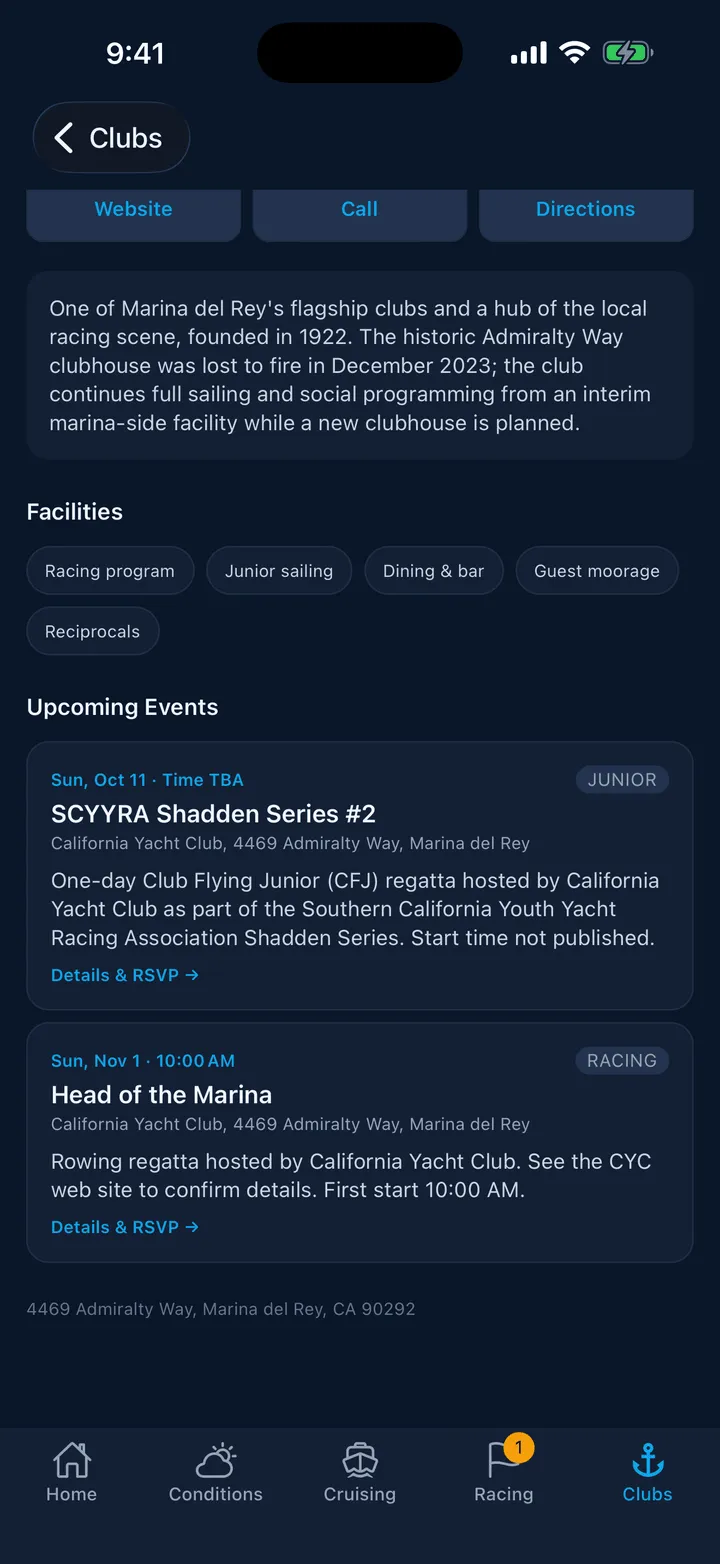
Under Upcoming Events, each row shows the date and time, a type pill reading Racing, Social, Junior or Clinic, the name, where it is, and a description.
When the club published a link, the card ends with Details & RSVP → and tapping it opens the club’s page for that event. When there is no link, the card is not tappable; it is there to tell you the event exists.
Some events show Time TBA instead of a time. That means the club published a date without one, usually because the event came off a printed calendar.
The list runs as far ahead as the club has published, with no cut-off. If it is empty you get No public events listed right now. Check the club’s website for the latest.
Featured Events on Home
Further down Home is a horizontal row of the soonest events across the harbor’s clubs, plus any club you belong to in another harbor. Tapping a card opens that club’s page rather than the event link. All clubs beside the heading opens the Clubs tab.
Getting told about new ones
Open Profile, go to Notifications, and turn on Club announcements, described as “New events from clubs you’ve joined”. It is off by default.
You then get a notification when one of your clubs posts a new public event. The title is the club’s name and the body is the event and its date, for example “Sunset Series · Sep 2”. Tapping it opens the club’s page.
You only get these for clubs you have added under My Clubs. See The club directory.
Where the events come from
Club events are gathered from the clubs’ own calendars and the ASMBYC calendar, then checked by hand. They are a snapshot rather than a live feed, so a club’s own site is always the last word, especially close to the day. Members-only events are not shown to anyone yet.
Still stuck? In the app, open Profile, then Help & Support, and use Send to support. Otherwise email support@slipside.app.