

How Crew Finder works
Two sides of one board, boats looking for crew and sailors available to crew, what you can see signed out, and the guidelines everyone agrees to before posting.
Also known as: crew finder, find crew, find a boat, crew board, looking for crew, available crew, sailing opportunities, get on a boat, community guidelines, rules
Crew Finder is the fourth view inside the Racing tab: tap Racing, then Crew.
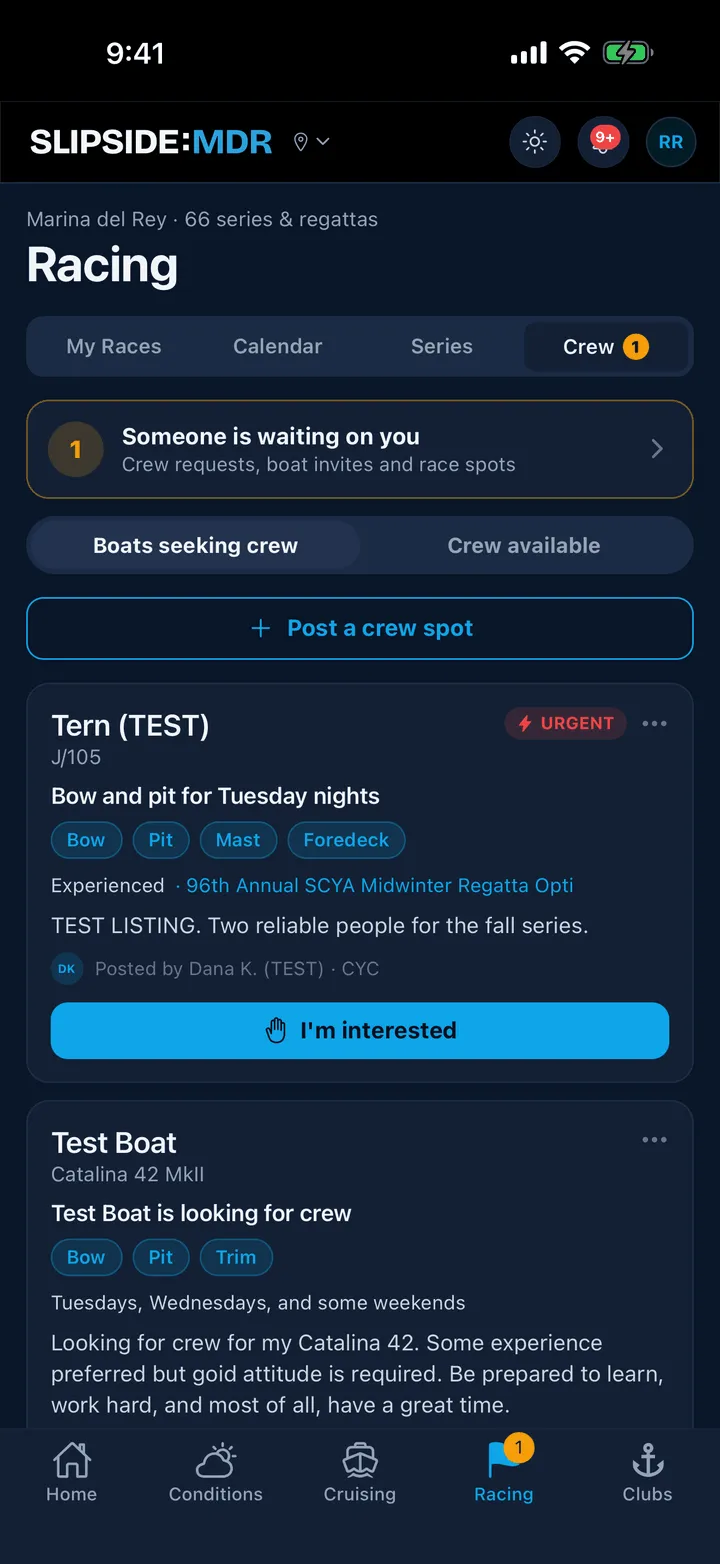
Two sides
- Boats seeking crew is skippers posting open spots.
- Crew available is sailors listing themselves.
Slipside opens the side that fits you: a skipper or boat owner lands on Crew available, everyone else on Boats seeking crew. Tap either segment to switch.
A boat’s card shows the boat, the class, the headline, the positions wanted, the experience level, the commitment, a note from the skipper and who posted it. A YOUR CLUB pill means the poster sails with a club you belong to, and those sort higher; an URGENT pill sorts higher still. A sailor’s card shows their name, experience, positions, when they are free, a line about themselves and any certifications.
The board is not filtered to one harbor. A thin board helps nobody, so listings from other harbors appear too, with the harbor’s name beside the poster’s name.
What you can do without an account
You can read both sides. Everything else, posting, listing yourself, expressing interest, reporting or blocking, needs an account: Browsing is open, but this needs an account.
Reaching out
The button on any card is I’m interested. On a sailor’s card it appears only for skippers and boat owners, because the board would not survive otherwise; if you sail as crew, you will see Skippers looking for crew can reach out here. instead. Set your role to Skipper in Profile if you own a boat and it is missing.
See Asking to sail, and answering.
The guidelines, once
The first time you post anything, Slipside shows five short rules and asks you to agree. They are worth the twenty seconds:
- Be who you are. Real name, real boat.
- Ask, don’t hound. One request per listing. If someone passes, let it go.
- Keep contact info in the handshake. Phone numbers and emails are shared automatically when a request is accepted; do not paste them into posts.
- No spam, no selling. Crew Finder is for finding crew and finding a ride.
- No harassment, full stop.
The app enforces the third one literally: contact details typed into a listing or a note are rejected. See Reporting, blocking and the rules.
Where the activity lands
Every request, invitation and answer collects on one screen, Crew activity, reached from the link at the top of the board. When something is waiting on you, the Racing tab and the Crew segment carry a badge.
Still stuck? In the app, open Profile, then Help & Support, and use Send to support. Otherwise email support@slipside.app.