

Your sailing profile
Set your name and photo, whether you sail as skipper or crew, your experience level, your clubs, and the Crew Finder details other sailors see.
Also known as: profile, name, photo, avatar, role, skipper, crew, experience level, clubs, my clubs, primary club, home club, sailing profile, change my details
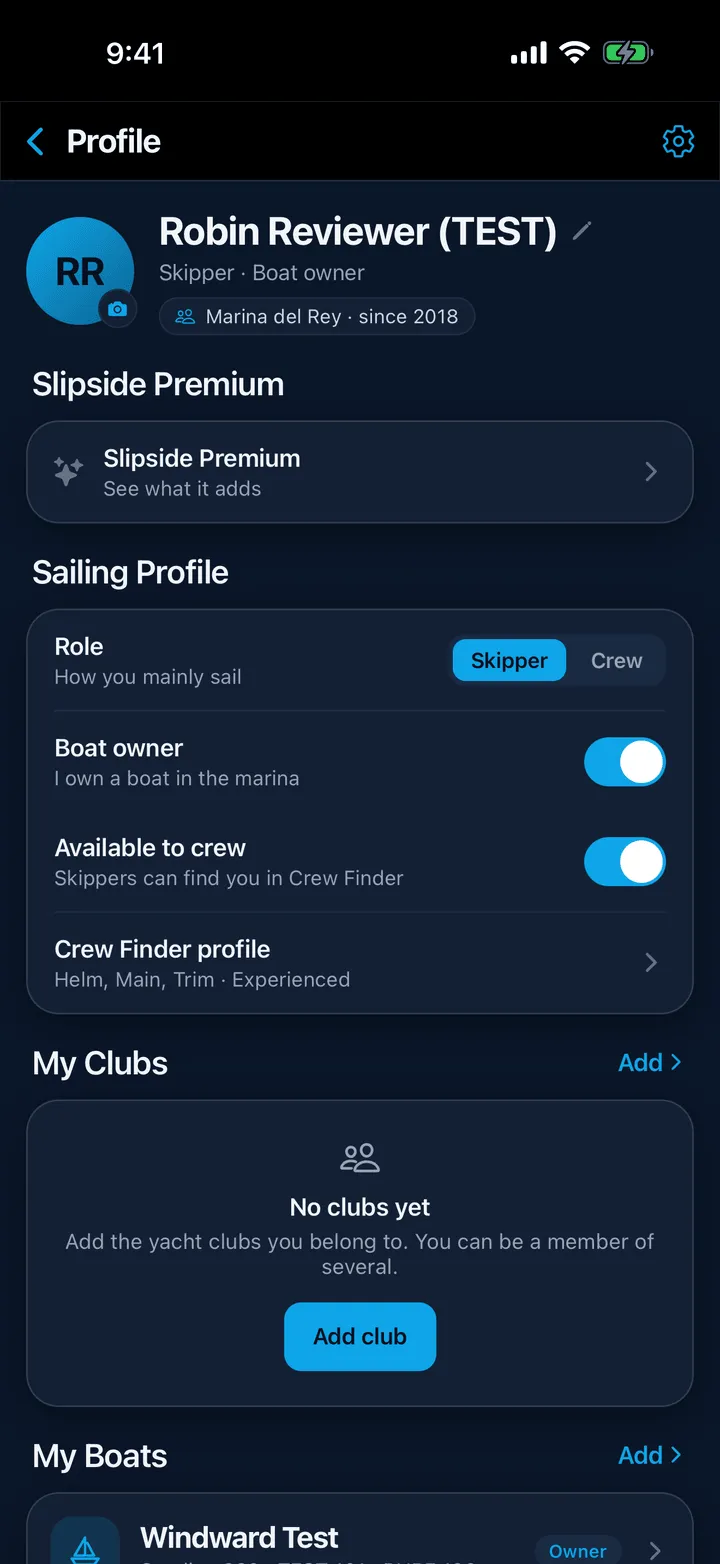
Everything about you lives in one place. Tap your avatar (or the person icon) at the top right of any screen to open Profile.
Your name and photo
Tap the round photo at the top to choose a picture from your phone; the first time, iOS or Android asks for permission to your photos. Your name comes from the account and shows on your Crew Finder card and to skippers whose boats you crew on.
Sailing Profile
Four rows, just under your name.
- Role is how you mainly sail, Skipper or Crew. It is not a permission, but setting it to Skipper is what lets you reach out to sailors on the Crew available side of Crew Finder.
- Boat owner says you own a boat in the marina. It has the same effect on Crew Finder, and it is set for you if you say you own a boat when you add one.
- Available to crew lists you on the Crew available board. Turning it on for the first time opens the crew profile form rather than flipping straight away, because a listing with nothing in it helps nobody. See Listing yourself as available crew.
- Crew Finder profile is that form: the positions you sail, your experience, your availability, certifications, a line about yourself, and how a skipper can reach you. The row’s subtitle summarises what you have set, for example “Bow, Pit · Experienced”.
Your email and phone number are never shown on your card. They are shared with one person, automatically, at the moment one of you accepts the other’s request.
My Clubs
Tap Add beside the My Clubs heading and pick every club you sail with. The first one you add becomes your primary club, and it shows on your profile; tap Set as primary on any other to change that. The X on a card removes an affiliation.
Belonging to a club puts a Member pill on that club’s page, brings its events onto your Home screen even when you are looking at another harbor, and lets you receive that club’s announcements if you turn them on.
Experience level
Under AI Briefing, Experience level is New, Club or Pro. It does two jobs: it tells other sailors roughly where you are, and it moves the thresholds behind the Should I sail today? verdict.
What follows you to another phone
Your name, photo, role, boat owner flag, experience level, clubs, boats, crew profile, home harbor and every notification setting are saved to your account. Your units, your light or dark theme, the briefing length and your racing regions are kept on the phone itself, so a new phone starts those at their defaults.
Still stuck? In the app, open Profile, then Help & Support, and use Send to support. Otherwise email support@slipside.app.